 Stratux
Which EFB App Works With Stratux?
Stratux speaks GDL90, the standard most EFB apps use for ADS-B receivers, so it works with nearly every major app.
Which app fits your device
Start with the device you fly with. Garmin Pilot works with Stratux on iOS only.
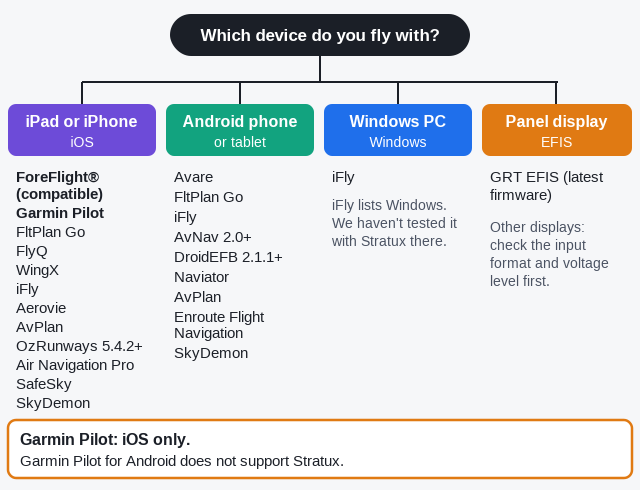
Compatibility by app and platform
| App | Platform | Traffic | Weather | AHRS |
|---|---|---|---|---|
| ForeFlight (compatible with ForeFlight®) | iOS | ✓ | ✓ | ✓ |
| Garmin Pilot | iOS only | ✓ | ✓ | ✗ |
| FltPlan Go | iOS, Android | ✓ | ✓ | ✓ |
| FlyQ EFB 2.1+ | iOS | ✓ | ✓ | ✓ |
| WingX | iOS | ✓ | ✓ | ✓ |
| iFly GPS 9.4+ | iOS, Android, Windows | ✓ | ✓ | ✓ |
| Aerovie Reports | iOS | ✓ | ✓ | ✓ |
| AvPlan EFB | iOS, Android | ✓ | ✓ | ✗ |
| OzRunways EFB | iOS | ✓ | ✓ | ✗ |
| Avare | Android | ✓ | ✓ | ✗ |
| Naviator | Android | ✓ | ✓ | ✓ |
| AvNav | Android | ✓ | ✓ | ✓ |
| DroidEFB 2.1.1+ (AHRS from 2.1.5) | Android | ✓ | ✓ | ✓ |
| Enroute Flight Navigation | Android, iOS | ✓ | ✗ | ✗ |
| GRT Avionics EFIS (latest firmware) | Panel | ✓ | ✓ | ✗ |
"Weather" means FIS-B, which is only broadcast on 978 MHz UAT in the United States and Canada. Apps are listed as reported by the community. Enroute reads Stratux traffic over FLARM-NMEA and gets its weather from the internet, so it shows no FIS-B. iFly lists a Windows version, but we haven't tested Stratux on it. App updates can change what's supported, so check your app's own documentation too.
How to connect
- Power on your Stratux and wait about two minutes for it to boot.
- On your tablet or phone, join the Stratux Wi-Fi network. There's no internet on it. That's expected.
- Open your EFB app. Most apps detect Stratux automatically within a few seconds.
- If your app asks which device to use, pick the GDL90 or "Stratux" option.
For technical setups: Stratux sends GDL90 over UDP port 4000 and FLARM NMEA on TCP port 2000. The web interface is at 192.168.10.1 while you're connected.
Tips for ForeFlight®, Garmin Pilot and panel displays
ForeFlight®-compatible setups:
- With Hide Distant Traffic on, ForeFlight hides traffic more than 15 NM away or more than 3,500 ft above or below you.
- Stratux Settings has an Ownship Mode S/OGN Codes field (hex, comma separated for several). Enter your aircraft's code there if your own aircraft shows up as traffic.
- Synthetic vision works without an AHRS for terrain and obstacles. Only the pitch and roll attitude part needs an AHRS board. See AHRS and ForeFlight's synthetic vision article.
Garmin Pilot for iOS works with Stratux now, so older forum posts saying it isn't supported are out of date for iPad and iPhone. Garmin Pilot for Android doesn't support Stratux.
Many panel displays accept GDL90 or FLARM NMEA over serial. Use a serial adapter and see the serial output guide.
Glider pilots: Stratux sends traffic as FLARM-format NMEA sentences (PFLAA and PFLAU) on TCP port 2000. Members of the Stratux Discord say XCSoar is the usual glider app to read it. We haven't confirmed which glider instruments (LX, Oudie, ClearNav and others) accept it, so check your device's manual before you count on it.
Seeing no weather or traffic? Read No weather or traffic first. On the ground, that's usually normal.