 Stratux
No weather or traffic on Stratux
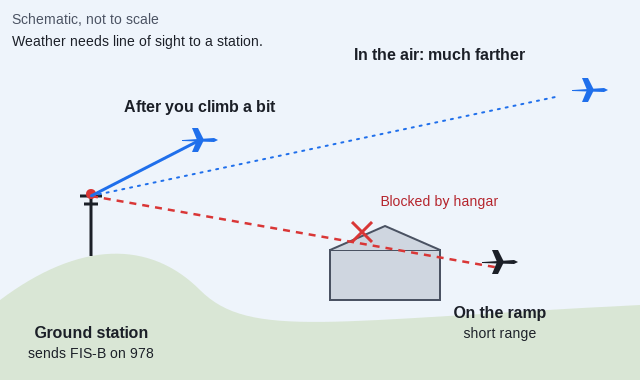
Short answer: on the ground, no weather is normal. Stratux gets weather from FAA ground stations by line of sight. From the ramp, you're almost always out of range, so it fills in after takeoff.
Why there's no weather on the ground
FIS-B weather is broadcast from ground stations on 978 MHz. In the air, a receiver can hear a station a long way off. On the ground, hangars, terrain and a low antenna cut that range short. Weather usually appears once the aircraft has line of sight to a station, which is often after a climb.
We'd check where the nearest stations are on the ground station map, and read ground stations and coverage for how range and altitude work. What FIS-B sends, and how far each station's products reach, is in FIS-B explained.
Traffic: what works on the ground and what doesn't
- 1090 MHz traffic broadcast directly by nearby aircraft works on the ground.
- 978 MHz ground-relayed traffic (TIS-B and ADS-R) generally needs altitude, radar coverage, and an ADS-B Out–equipped aircraft nearby for the ground station to serve. If your aircraft doesn't have ADS-B Out, you'll only see relayed traffic generated for nearby aircraft that do. That picture is incomplete by design. See what you see without ADS-B Out. For the full client rules, read TIS-B and ADS-R.
Still no weather or traffic in the air? Check these five things
- Is the weather layer turned on in your EFB? Your app draws the weather on its map. The Stratux web interface has a Weather page. Use it to confirm the receiver is getting weather.
- Is your EFB connected? Confirm the tablet is on the Stratux Wi-Fi network and the app shows the receiver.
- Open the status page at 192.168.10.1 and look at the UAT Statistics rows (Towers, METARS, TAFS, NEXRAD). If those counts rise in flight, Stratux is getting weather. The UAT bar also counts traffic, so a rising bar alone doesn't prove weather.
- Check the antennas are attached, hand-tight, and on the right ports. See Antennas.
- Are you in range? Outside the US and Canada, 978 MHz weather depends on a nearby ground station. In Europe, you'd add an 868 MHz radio if you want FLARM and OGN traffic.
Traffic looks wrong
- Wrong altitudes in ForeFlight®-compatible setups: turn off the ownship setting in the Stratux web interface.
- Missing distant traffic: some EFBs hide distant traffic. ForeFlight does it with Hide Distant Traffic on, beyond 15 NM or 3,500 ft above or below you.
- "Ghost" or shadow traffic near your own position: usually TIS-B behavior when ground stations rebroadcast your own aircraft. It's a known quirk of the system, not a Stratux fault.
ADS-B traffic is advisory. A quiet display means "no traffic shown," never "no traffic." Keep looking outside.
Frequently asked questions
Why does Stratux show no weather on the ground?
ADS-B ground stations are line of sight. On the ground, reception range is short, so weather usually appears only after takeoff, once you have line of sight to a station. This is normal, not a fault.
Why do I see some traffic on the ground but not all?
Traffic broadcast directly on 1090 MHz by nearby aircraft works on the ground. Traffic relayed by ground stations (TIS-B and ADS-R) generally needs altitude and depends on radar coverage and nearby ADS-B Out-equipped aircraft.
Why are some traffic targets missing in ForeFlight?
ForeFlight can hide traffic more than 15 NM away or 3,500 ft above or below you, if Hide Distant Traffic is on.
Curious how far a ground station reaches? Play Tower Hunt to log real FAA ground stations, or Signal Path to see how coverage works. Once the weather shows up, METAR Rush is a quick way to practice reading it.