 Stratux
How Stratux fan control works: a 50 °C target
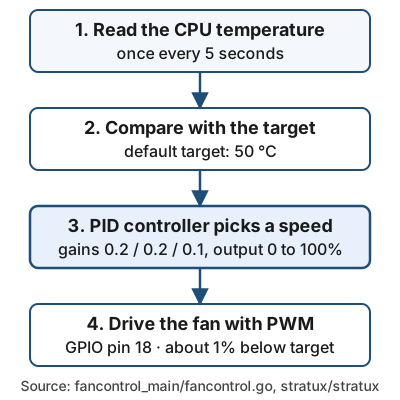
The Stratux fan program tries to hold the CPU at 50 °C. Below that the fan idles at about 1% duty, and it speeds up as the CPU gets hotter. It checks the temperature every 5 seconds.
The fan is a thermostat that never fully stops
The fan program, fancontrol, runs a feedback loop instead of a simple on/off switch. Each cycle it reads the CPU temperature, compares it with the target, and sets a fan speed. The values below come from the Stratux source, read on 2026-11-02.
| Setting | Value in the code |
|---|---|
| Target CPU temperature | 50 °C (defaultTempTarget) |
| Update interval | 5,000 ms |
| PID gains (P, I, D) | 0.2, 0.2, 0.1 |
| Output range | 0 to 100% duty |
| Below the target | about 1% duty, so the fan never fully stops |
Minimum duty (PWMDutyMin) |
0 by default |
| Fan pin | GPIO 18 (BCM numbering), driven with PWM |
A PID controller adds three terms: how far the temperature is from the target, how long it has been off, and how fast it is changing. That is why the fan ramps up smoothly as the CPU passes 50 °C and doesn't jump between off and full speed. You will usually notice it spinning up somewhat above 50 °C, which is where the "about 55 °C" figure comes from.
What you can change
Two settings matter: the minimum duty cycle and the target temperature. The web interface exposes the first. The second is a command-line flag.
- Minimum fan duty cycle (
PWMDutyMin, default 0): on the Settings page, passed to the fan program. - Target temperature: the
fancontrolprogram accepts-temp. It also accepts-minduty,-frequencyand-pin. This is for advanced users. Whether the target can also be set from/boot/firmware/stratux.confis not confirmed, so don't count on it. - Fan wiring: the fan's PWM line uses GPIO 18, which is physical pin 12 on the Pi header. Check the polarity when you connect it: red goes to +.
What this means for a hot cockpit
Airflow decides how well the loop works, because the fan can only move air the case lets through. Keep the side vents clear, and keep the unit out of direct sun on the glareshield when you can. If a unit goes dark after a few minutes, check for heat first. A fan helps more than case colour, according to the power guide. For printed cases, the 3D-printed cases guide covers filament that survives a hot cockpit, and Inside Stratux shows where the fan sits.
Raspberry Pi 5: no fan control reported
The standard board is the Raspberry Pi 3B or 3B+. A Pi 4 works but runs hotter. On a Pi 5, community reports say the fan does not work. The fan program has no Pi 5-specific code and uses the same go-rpio library and GPIO 18 default as on other boards, and nobody has documented why it fails. Until a maintainer confirms the cause, treat a Pi 5 as unsupported for fan control.
Frequently asked questions
At what temperature does the Stratux fan turn on? It never fully switches off. The program aims at 50 °C, holds the fan at about 1% below that, and speeds up as the CPU gets hotter.
Can I change the target temperature?
Yes, with the -temp flag on the command line. The Settings page exposes only the minimum duty cycle.
Does fan control work on a Raspberry Pi 5? Community reports say no, and the code has no Pi 5 handling. The cause isn't documented.
Is a fan really needed? If a unit goes dark after a few minutes, check heat first. Keep the vents clear and make sure the fan spins.
Next step
Open your case, check that the fan spins freely and its red lead goes to +, and see Inside Stratux for the full parts list.